



Skip to content
consile

e-conomic in your AI assistant

Consile’s connector for e-conomic. Ask about invoices, debtors and the daybook, and get answers from your own books.

Try free for 7 days

39

EUR/month excl. VAT for 1 user and 1 agreement

40

tools. An administrator chooses who gets which

5

AI assistants and more

ClaudeChatGPTMicrosoft CopilotGrokLocal AI (Ollama)

Preview before changes

Control

Your AI assistant shows a preview of the change, and anything that books waits for your yes. Invoices and credit notes become drafts that you book yourselves in e-conomic. If you want a hard stop, an administrator can require approval for a tool, so every call waits for a yes in the portal.

Security

Answers from your own books

Straight from e-conomic

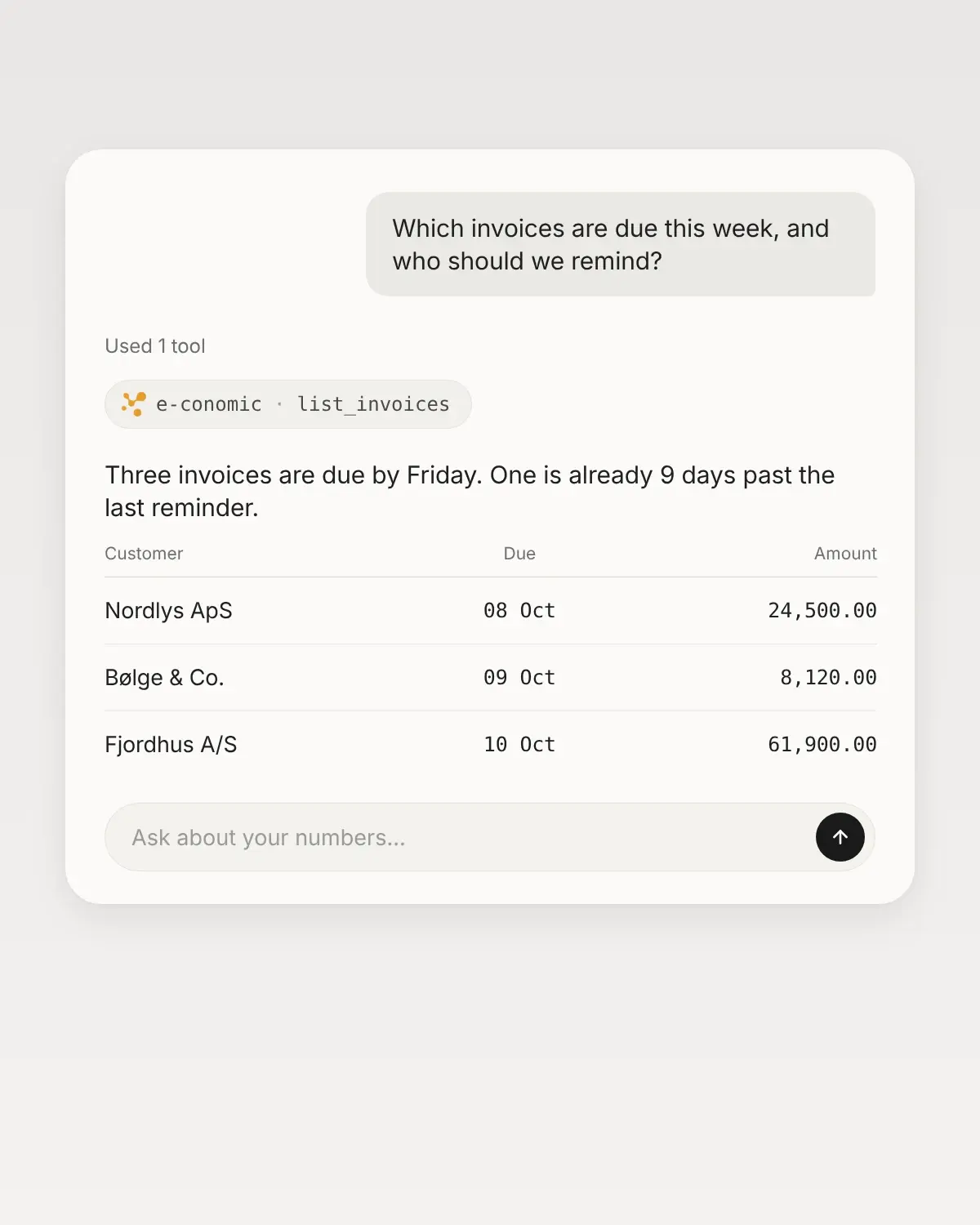
Ask about overdue invoices, balances or a single customer, and get the answer from the numbers as they stand in e-conomic right now.

Several agreements, one assistant

Several agreements

If you have several e-conomic agreements, for example for several companies, you connect each agreement separately. It appears with the company name and agreement number and gets its own address in your AI assistant.

We have always had a good grip on our numbers, but the process was heavy, even with integrations to e-conomic. With Consile’s e-conomic MCP we have built the overviews and flows that create value in day-to-day operations and give management better insight. And colleagues without access to e-conomic can now work with and update data directly from Claude.

Kiranan LuxmyFounder & CEO, Grafikr

Tools

What the assistant can do in e-conomic.

28

read

Answers from your own numbers, fetched the moment you ask.

  • Receivables and reminders

    Who owes you money, how much is overdue, and who should get a reminder.

    Ask, for example"Which customers are most overdue right now?"

  • Customers and invoices

    Find a customer, a booked invoice with its lines, or the drafts that are waiting.

    Ask, for example"Show the lines on the latest invoice to customer 1024."

  • The accounts

    Chart of accounts with live balances, entries per account and year, financial years and VAT codes.

    Ask, for example"What is the movement on account 1010 in 2025?"

  • Daybook, products and suppliers

    Unbooked entries in the daybook, products with sales and cost price, and your suppliers.

    Ask, for example"Show the unbooked entries in daybook 1."

12

create and change

Anything that books waits for your yes, and an administrator can require approval for each tool.

  • Customers

    Create new customers with a contact person and delivery location, or edit the ones you have.

    For example"Create Hansen Cykler ApS as a new customer in DKK."

  • Invoices and credit notes

    New invoices, copies and credit notes become drafts that you book yourselves.

    For example"Make a draft invoice for customer 1024 with 2 lines."

  • The daybook

    Create, edit and delete unbooked entries, and book the ones you have seen in a preview. No more than 50 at a time.

    For example"Book entries 41 and 42, but show them to me first."

An administrator picks exactly which tools each person gets, including themselves. The assistant cannot book or send invoices and credit notes. It cannot correct or delete what has been booked, and booking from the daybook cannot be undone.

Get started

5 steps from account to first answer, without code or consultants.

  1. 01 Buy the connector

    An administrator adds e-conomic in the Consile portal. The first 7 days are free.

  2. 02 Connect e-conomic

    Log in as Superuser on the agreement, and approve the Consile app on e-conomic’s own page.

  3. 03 Choose access

    An administrator picks exactly the tools each person gets, including themselves.

  4. 04 Add it to your AI assistant

    Add the address from the portal as a connector in your AI assistant.

  5. 05 Ask the first question

    For example, which customers are most overdue right now.

Pricing

One price. Add more as you grow.

Free

0EUR/month

Try it with your own data, without talking to a salesperson.

  • 100 calls a month. A question typically uses 5-6 calls.
  • Every system except CVR
  • 1 user
  • 1 custom connector in Studio
Start free

For new accounts. It is ready the first time you log in.

All systems

45EUR/month

First user and first company. Every system is included, CVR and new systems too.

  • No cap of 100 calls. Fair use applies.
  • Extra user: EUR 22.50
  • Extra company: EUR 45
  • 3 custom connectors per user and per extra company
  • Extra custom connector: EUR 6.50
Start free

The first 7 days are free if you have not paid us before. No commitment.

One system

Buy only the system you need.

From EUR 19/month

An extra user or agreement costs half the price.

e-conomic

299kr./md.

  • 1 bruger og 1 portal
  • Ekstra bruger eller portal: 149.50 kr./md.
  • Calls to the system do not count toward the 100 free calls.
  • The first 7 days are free.

All prices are per month and excl. VAT.

Questions about e-conomic

Can the assistant change anything in our bookkeeping?

Only what the person has access to. An administrator chooses None, Read only, Full access or Custom for each person, including themselves. On Read only, Consile rejects all writes for that person on the server. For everyone else, anything that books waits for your yes, and invoices and credit notes always become drafts. An administrator can also require approval for a tool, so every call waits for a yes in the portal.

Can we turn tools off for the whole organization?

Yes. An administrator can turn each tool on and off on the connector’s page in the portal. A tool that is turned off disappears for everyone, including those with Full access. New tools stay off until an administrator turns them on.

Who needs to connect e-conomic?

The person connecting must be able to log in as Superuser on the agreement in e-conomic. The connection applies to the whole organization, so colleagues do not need to connect again.

Does it work in Microsoft 365 Copilot and HubSpot?

Yes. Your IT administrator can download a ready-made Copilot package for e-conomic in the portal and upload it to Microsoft 365 (pilot). In HubSpot, you can add the connector in Breeze. The steps are on the connector’s page in the portal.

Does it work with several agreements?

Yes. An administrator adds an extra agreement for EUR 19.50/month. Each agreement gets its own address in your AI assistant.

What does it cost?

EUR 39/month excl. VAT for 1 user and 1 agreement. Each extra user or agreement costs EUR 19.50/month. The first 7 days are free, and there is no commitment. Also included in Consile Studio: all 13 systems from EUR 45/month for the first user and first company.

Can we cancel?

Yes. An administrator disconnects it in the portal, and the stored access is deleted immediately. Also remove the Consile app in e-conomic’s own settings. To stop payment too, an administrator cancels the subscription, which then runs to the end of the period.

Contact

Ask us about the rest.

We use the details to reply to you. Privacy policy

See e-conomic in your AI assistant.

Connect your first system and ask the first question. Free for 7 days.

Try free for 7 days